MiniDLNA Manager: an app to bring movies from the PC to the living room TV
How a Marvel marathon turned into a GTK4 app to manage MiniDLNA on Linux, with a privileged helper through Polkit, ACLs, a systemd override and libadwaita 1.1 compatibility.
- python
- linux
- gtk
- projects
About two months ago my wife and I started a saga: watching every Marvel movie and series, in order, up to the movie that comes out in December 2026. It will mark the start of the MCU reboot, and the idea is to get there all caught up.
We have a Disney+ subscription, but the plan has too many ads, and a marathon with commercial breaks gets old fast. So I went back to the old ways and downloaded the episodes by torrent. Then the real problem showed up: the files were on my PC, and we watch on the living room TV.
Serving media over the network with DLNA
The TV can already read content from the local network through DLNA, an old standard that is still widely supported. All it takes is a media server on the PC announcing the files, and the TV finds it on its own. One of the simplest servers for this on Linux is MiniDLNA (also called ReadyMedia): you point it to the folders in a config file, start the service and you’re done.
That’s the theory. Setting up MiniDLNA by hand means editing /etc/minidlna.conf as root, restarting the service through systemctl and reading the log through journalctl to find out why the TV shows empty folders. And the answer usually comes down to two details:
minidlnadruns as its own user,minidlna. A folder inside your/homeusually has 700 or 750 permissions, so that user cannot even get into it.- The systemd service ships with
ProtectHomeon, which hides/homefrom the process entirely. While that is active, no file permission will help.
Doing this once is fine, but changing folders or figuring out why the TV couldn’t find the server meant repeating the ritual in the terminal. So I wrote an interface for it.
MiniDLNA Manager
MiniDLNA Manager is a desktop app for Linux, written in Python with GTK4 and libadwaita, that handles all of MiniDLNA from a window with three tabs.
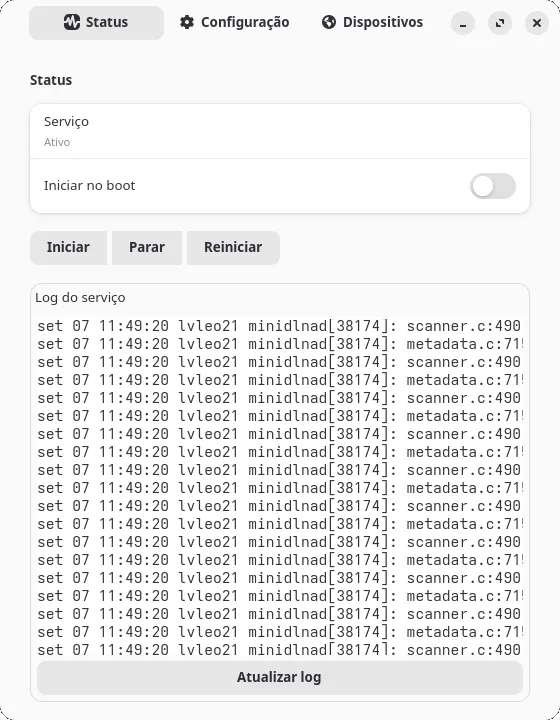
The status tab shows whether the service is running, has start, stop and restart buttons, a switch to start it with the system and the last lines of the log:
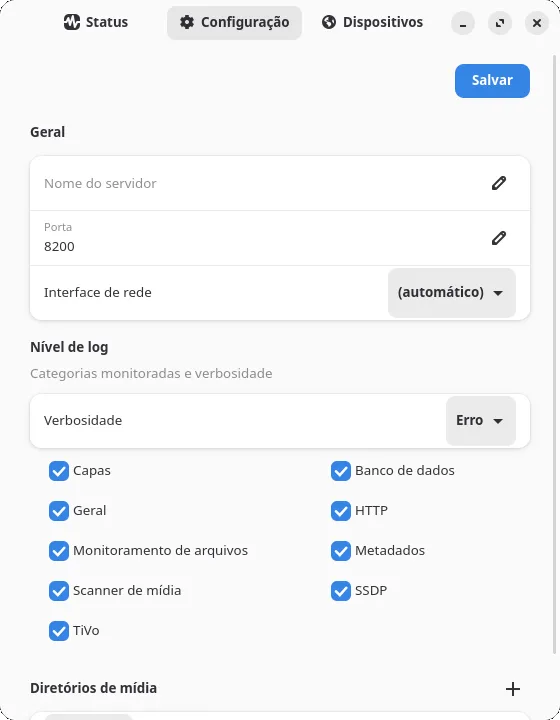
The configuration tab replaces editing minidlna.conf with a form: server name, port, network interface, log level per category and the media directories, picked with the system folder chooser. Everything is validated before it is written (the port, for example, has to be free), and after saving the app offers to restart the service to apply the change:
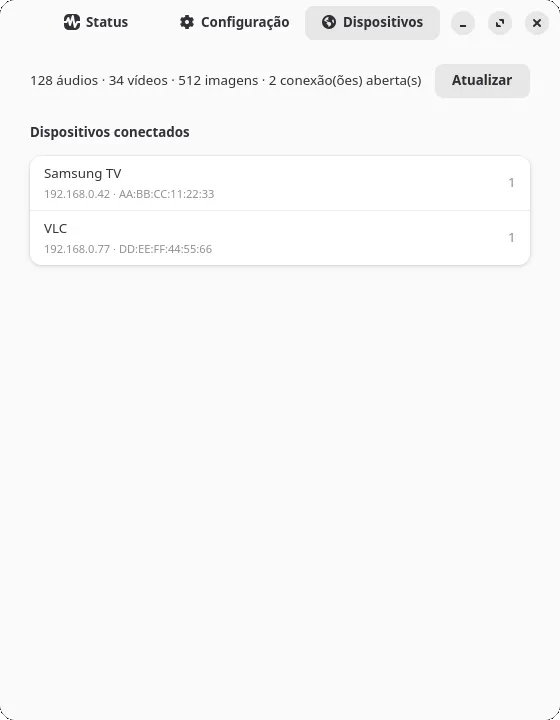
The devices tab shows how many audio, video and image files the server has indexed and which devices are connected:
If MiniDLNA isn’t even installed, the app detects it and offers to install it from the interface itself, using the distribution’s package manager (apt, dnf, pacman or zypper).
How it works inside
The interface never runs as root
Almost everything the app does needs privileges: calling systemctl, writing to /etc and installing packages. The easy way would be to run the whole window with sudo, and that is exactly what I wanted to avoid. A graphical interface is a lot of code to run as root.
The solution was to split off a small helper, the only piece that runs with privileges. The interface calls this helper through pkexec, and Polkit asks for the administrator password before letting it run. The helper accepts only a fixed list of subcommands (start, stop, restart, enable, disable, write-config, install-package and ensure-home-access) and never runs a command that comes from outside. Even the path of the config file is fixed in the code, instead of arriving as an argument.
def build_arg_parser() -> argparse.ArgumentParser:
    parser = argparse.ArgumentParser(prog="minidlna-manager-helper")
    subparsers = parser.add_subparsers(dest="action", required=True)
    subparsers.add_parser("is-installed")
    subparsers.add_parser("install-package")
    subparsers.add_parser("write-config")
    subparsers.add_parser("ensure-home-access")
    for action in ("start", "stop", "restart", "enable", "disable"):
        subparsers.add_parser(action)
    return parser
The Polkit rule uses auth_admin_keep, so the password is asked once and lasts for a few minutes, instead of popping up on every click. Checking the service state and reading the log need no privileges at all, so those parts don’t even go through the helper.
The configuration is written to a temporary file in the same folder and then moved into place with os.replace. If something fails halfway, the old minidlna.conf stays intact. The new file also inherits the permissions of the previous one, because mkstemp creates files with 0600, and minidlnad, running as its own user, would no longer be able to read the configuration.
Opening up the /home folders
The two obstacles from the start of the post are solved separately.
For ProtectHome, the helper creates a systemd drop-in, the standard way to adjust a service without editing the file that came with the package. It swaps full protection for read-only, so the daemon can see /home but still can’t write to it:
# /etc/systemd/system/minidlna.service.d/minidlna-manager-protecthome.conf
[Service]
ProtectHome=read-only
For the permissions, the app uses ACLs instead of opening the folders to everyone. When you pick a media directory, it gives the minidlna user permission to traverse each folder along the path and read permission on the chosen folder, including files added later:
setfacl -m u:minidlna:x /home/user          # and each folder in between
setfacl -R -m u:minidlna:rx /home/user/Videos/Marvel
setfacl -R -d -m u:minidlna:rx /home/user/Videos/Marvel
This only applies to folders inside your own home directory and never touches the “others” permission. Since it is your user adjusting your own files, this part doesn’t even need a password.
Finding out who is connected
MiniDLNA has no command that lists the connected devices. The only source for that information is an HTML status page that minidlnad itself serves at http://127.0.0.1:8200/status, with two tables that have no id or class. The devices tab sends a GET to that page and reads the tables with the standard library’s HTMLParser, in the order they appear: the first has the file counts, the second has the clients.
Running on older distributions
I wrote the interface against the current libadwaita, and version 0.2.0 simply wouldn’t open on Ubuntu 22.04 and Linux Mint 21, which ship GTK 4.6 and libadwaita 1.1. Several widgets I used, such as Adw.EntryRow, Adw.SwitchRow and Gtk.FileDialog, only exist in newer versions.
The fix, in 0.2.1, was a compatibility module. It checks whether each widget exists instead of comparing version numbers, because a distribution may have backported a feature. When the widget exists, the app uses the native one; when it doesn’t, it builds an equivalent from libadwaita 1.0 components:
HAVE_ENTRY_ROW = hasattr(Adw, "EntryRow")  # 1.2
HAVE_BANNER = hasattr(Adw, "Banner")  # 1.3
HAVE_SWITCH_ROW = hasattr(Adw, "SwitchRow")  # 1.4
HAVE_TOOLBAR_VIEW = hasattr(Adw, "ToolbarView")  # 1.4
HAVE_FILE_DIALOG = hasattr(Gtk, "FileDialog")  # GTK 4.10
An import test doesn’t catch this kind of error, because the widget is only accessed when the window is built. That’s why CI installs the .deb and actually opens the window on four images: Ubuntu 22.04, Debian 12, Ubuntu 24.04 and Debian 13. They cover everything from the case where every fallback is in use to the case where everything is native. On top of that, CI runs ruff, the 139 pytest tests and lintian on the package.
Installing
Ready-made packages are on the releases page. On Debian, Ubuntu and Mint:
sudo apt install ./minidlna-manager_*_all.debOn Arch and Manjaro:
sudo pacman -U minidlna-manager-*.pkg.tar.zstThe .deb package declares the minimum GTK and libadwaita versions, so apt refuses to install it on an unsupported system instead of installing an app that won’t open. There is no Flatpak yet; for other distributions, the README explains how to run it from source.
Meanwhile, the marathon goes on. The code is MIT-licensed and on GitHub, and issues and suggestions are welcome.